Import Panel
The Import panel on the dlrSecured Mass Enrollment screen is used to enroll employees in dlrSecured Identity Management using information from an imported file.

|
To access the Import panel, click IMPORT button on the dlrSecured List Import window. The Import panel displays on the dlrSecured Mass Enrollment screen. |
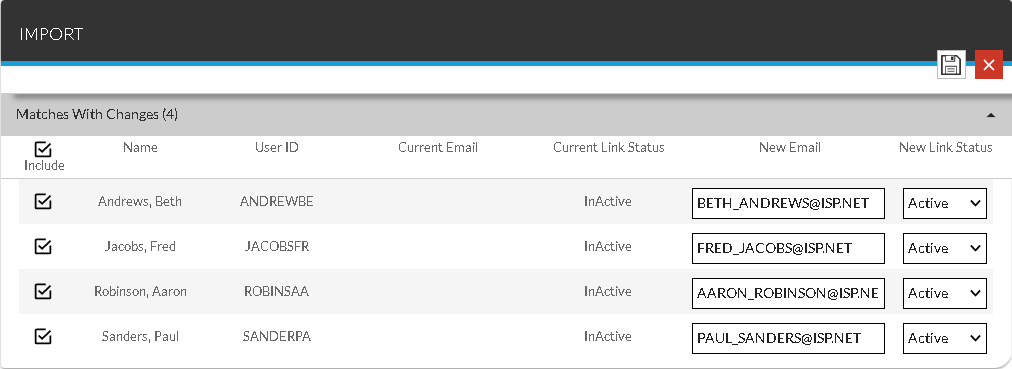
To update an employee's dlrSecured information, select the Include check box, update the entries in the New Email field and the New Link Status field as needed, and click the  (Save) icon.
To select each Include check box in the Matches with Changes section, select the Include check box at the top of the section.
For more information about importing Email addresses to enroll employees in dlrSecured, refer to How to Import Email Addresses to Enroll Employees in dlrSecured Identity Management.
 Matches with Changes Section
The Matches with Changes section is used to review and update information from the imported file that matches employees in the XtreamService application. This section can be used to update the employee's dlrSecured Email address and status.
The following items are available in the Matches with Changes section.
Include: Select this check box to update each employee record with the corresponding information. Clear this check box to prevent the employee records from being updated by the imported file. Alternatively, select this check box corresponding to the individual employee records to update.
Name: The name of the employee displays.
User ID: The User ID of the employee displays.
Current Email: The Email address linked to dlrSecured Identity Management displays.
Current Link Status: Whether the employee is enrolled in dlrSecured displays. If the employee is enrolled, Active displays. Otherwise, InActive displays.
New Email: Enter the Email address to link to dlrSecured. This Email address is used by the employee to sign on to the XtreamService application using dlrSecured.
New Link Status: Select whether the employee can sign on to the XtreamService application using dlrSecured. Select Active in this field to require the employee to sign on using dlrSecured. Alternatively, select InActive to require the employee to use the standard sign on process to access the XtreamService application.
No Matches Section
The No Matches section is used to review information from the imported file that does not match employees in the XtreamService application. If the information is correct, a user record must first be added for the employee and then the employee can be enrolled in dlrSecured.
The following items are available in the No Matches section.
User ID: The User ID of the employee displays.
dlrSecured Identity Email: The Email address linked to dlrSecured Identity Management displays.
Link Status: Whether the employee should be enrolled in dlrSecured displays. If the employee should be enrolled, Active displays. Otherwise, InActive displays.
Click here for a list of products that may be mentioned in this help file.